Book an Appointment
Call Miami Computer Repair Service at 786-780-1540
                   

(786) 780-1540

*


Miami Computer Repair Service has provided the best mobile computer repair in Miami, FL and the greater Miami Metropolitan Area since 1999. The term "mobile computer repair" means we come to you to resolve all your computer problems.

We repair laptops, desktops, PCs and Apple computers. One of our highly qualified staff will come to you, often the same day, to take care of all your repair needs.

Why not use the #1 rated company for computer repair in Miami, FL?

Computer Repair 4.9 / 5 stars from 324 reviews
Why use a computer tech when you can have a Miami based Computer Engineer? Mon-Sun 8:00am - 8:00pm

Call us at (786) 780-1540

Text us at (786) 780-1540

Email us your questions

Book an Appointment

"Great service and friendly staff. Got my computer fixed same day, thank you!"
Miami Computer Repair Service 5 / 5 stars
"Dustin, the technician, did an awesome job. He kept me informed along the job. Techs like Dustin, make me a customer for life. "
Miami Computer Repair Service 5 / 5 stars
"Wonderful service, from the initial phone call and scheduling, very upfront on costs. The tech showed up on time, with a 15 min courtesy call, he was professional, knowledgeable and gave great advice. He replaced my hard drive and got me back up and running. I would recommend this service. I chose it because of all the positive online reviews and I was not disappointed."
Miami Computer Repair Service 5 / 5 stars
"Josh was again superb. He reinstalled my HP printer software and now I can scan once again. Much thanks for your service."
Miami Computer Repair Service 5 / 5 stars
"Fast service! Fixed all of my computer problems and was very helpful in making suggestions on products I needed. He arrived on time and was professional. Overall a very pleasant experience and I will call again!"
Miami Computer Repair Service 5 / 5 stars

Who is Miami Computer Repair Service?

Miami Computer Repair Service is owned by Matt Karls, an Electrical Engineer and a Computer Systems Engineer. We are a team of computer professionals focused on Service and quality, all our work is guaranteed.

If you have any computer, technology or IT problem in Miami, FL we can fix it. We have been performing computer repair in Miami full time since 1999. Feel free to give us a call or text us at (786) 780-1540.

Miami Computer Repair Service's Computer Engineer

What is your Service Area for on-site Computer Repair?

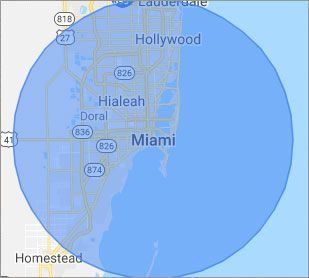
Our primary on-site mobile service areas include the greater Miami Metropolitan Area as well as the Tampa, Orlando and Jacksonville metro areas.

We provide mobile computer repair in Miami, Fort Lauderdale, Hollywood, West Palm Beach, Hialeah, Pembroke Pines, Miramar, Sunrise, Coral Springs, Miami Gardens, Boca Raton, Pompano Beach, Davie, Plantation, Miami Beach, Deerfield Beach, Boynton Beach, Doral, Weston, Coral Gables, Aventura, Key Biscayne, Miami Shores, Palmetto Bay, Palm Beach Gardens, Pinecrest, Margate, Parkland, Delray Beach, Jupiter, Royal Palm Beach and Wellington.

Our on-site Computer Service Area

What should someone expect that hires you for Computer Service?

Our mission is to fully resolve your computer problems quickly and affordably. If you want a Computer Engineer that can fix all of your computer problems instead of a computer tech, a computer geek, a technician or a computer guy that can only fix some of your problems; call us at (786) 780-1540.  

What types of Computer Services do you perform?

We service businesses and business clients in their homes, including:
 
  • Diagnose / repair hardware or software problems
  • Spyware, malware, trojan and virus removal
  • Setup wireless and small business networks
  • Laptop repair, PC repair and Apple repair
  • Hard drive data recovery

Miami Computer Repair Service Contact Information

Miami Computer Repair Service
252 E Flagler St #131
Miami, FL 33131
(786) 780-1540

Miami Computer Repair Service is a Karls Technology company

* *
*
*
*
  *
* *


*
*
* * * * * * * * * * * * * * *
4.9 / 5 stars from 324 reviews

"Great service and easy to work with!!!"

Miami Computer Repair Service 5 / 5 stars

"Anthony was very helpful in each step of the process, very professional."

Miami Computer Repair Service 5 / 5 stars

"My tech was great and appeared knowledgeable, I won't hesitate to contact again and I would highly recommend."

Miami Computer Repair Service 5 / 5 stars

"Taylor worked through 6 PC systems with great ease. Very satisfied with his skills and his help servicing our systems."

Miami Computer Repair Service 5 / 5 stars
Best Antivirus Software of 2026: The Ultimate Guide to Cybersecurity Brands

In 2026, the digital threat landscape has shifted. We are no longer just fighting simple viruses; we are defending against AI-generated phishing, sophisticated ransomware-as-a-service, and complex identity theft. Choosing the right antivirus brand is no longer optional—it is the foundation of your digital life. At Karls Technology, we’ve analyzed the top-performing security suites of the […] The post Best Antivirus Software of 2026: The Ultimate Guide to Cybersecurity Brands appeared first on Computer Repair Blog.

Hide Taskbar Temporarily on Windows 10

Using Windows’s taskbar settings, you can temporarily hide the bar if you just need to do so. To customize your taskbar, right-click anywhere on it and choose “Taskbar Settings.”Move the slider under Desktop mode to enable the option to automatically conceal the taskbar. The desktop mode option enables full-screen mode when used. Simply move your […] The post Hide Taskbar Temporarily on Windows 10 appeared first on Computer Repair Blog.

Windows OS is Unresponsive – Fast Startup

Turning off this feature could be the quickest and easiest approach to solve this problem. The useful function known as “Fast Startup” maintains your Windows OS in the hibernation mode so that it does not need to be completely relaunched after it has been shut down. This results in a significantly quicker reboot. Even though […] The post Windows OS is Unresponsive – Fast Startup appeared first on Computer Repair Blog.

Apple Announces iPhone 14

Apple unveiled three new Apple Watch models, a redesigned AirPods Pro, and an improved Apple Fitness+ during their latest virtual presentation. The head honcho of the event, however, was the iPhone 14. The new iPhone comes in a variety of colors to choose from. It also includes a 48-pixel camera to take the ultimate pictures […] The post Apple Announces iPhone 14 appeared first on Computer Repair Blog.

Downgrading Back to Windows 10

There are many new and improved features in Windows 11, and the OS may also be customized to your liking in terms of its look and feel. If you install Windows 11 and find that you don’t like it, you may always revert to a previous version. You can use this function for free for […] The post Downgrading Back to Windows 10 appeared first on Computer Repair Blog.

New macOS Update Releasing Soon

Apple has confirmed that the public release of macOS Ventura will occur on Monday, October 24. According to 9to5mac, there will be a number of new additions to this newest version of macOS. Using an iPhone in place of a webcam on a computer is now possible thanks to the next version of the operating […] The post New macOS Update Releasing Soon appeared first on Computer Repair Blog.

Upgrade to Windows 11 now or wait longer?

Windows 11 is the latest operating system from Microsoft, first released in 2022. This updated version of Windows was highly anticipated by the millions of users around the world who have been eagerly waiting for it. In this article, we will take a closer look at Windows 11 and what it has to offer. First […] The post Upgrade to Windows 11 now or wait longer? appeared first on Computer Repair Blog.

Adding Shortcuts to Desktop Taskbar

Pinning a new shortcut to your Windows taskbar makes it instantly accessible from wherever on your computer. To see every app on your Windows device, press the Windows key, then click All programs. To pin an app to the taskbar, right-click it, select “More,” and then click “Pin to taskbar.” If the program is already […] The post Adding Shortcuts to Desktop Taskbar appeared first on Computer Repair Blog.

Change Windows Update Times

You can alter the the times your computer is available to update. And it’s easy to do so. Schedule Windows Update to begin and end at certain times. The configuration tool may be launched by searching the Windows Update settings. The parameters may be updated to alter the active times. Select new working hours here. […] The post Change Windows Update Times appeared first on Computer Repair Blog.

Removing Icons on Desktop

One of the quickest and easiest methods to free up space and boost Windows 10’s performance is to get rid of the icons cluttering your desktop. In Windows 10, you can quickly and easily clear your desktop of icons with only a few clicks. It’s as simple as right-clicking an icon on the Windows 10 […] The post Removing Icons on Desktop appeared first on Computer Repair Blog.